
Google Is Ending Gmailify in 2026: What It Means for Your Email & What To Do Next
If you currently use a free Gmail account to check for emails from your hosted website using your domain—there’s an important change happening now.
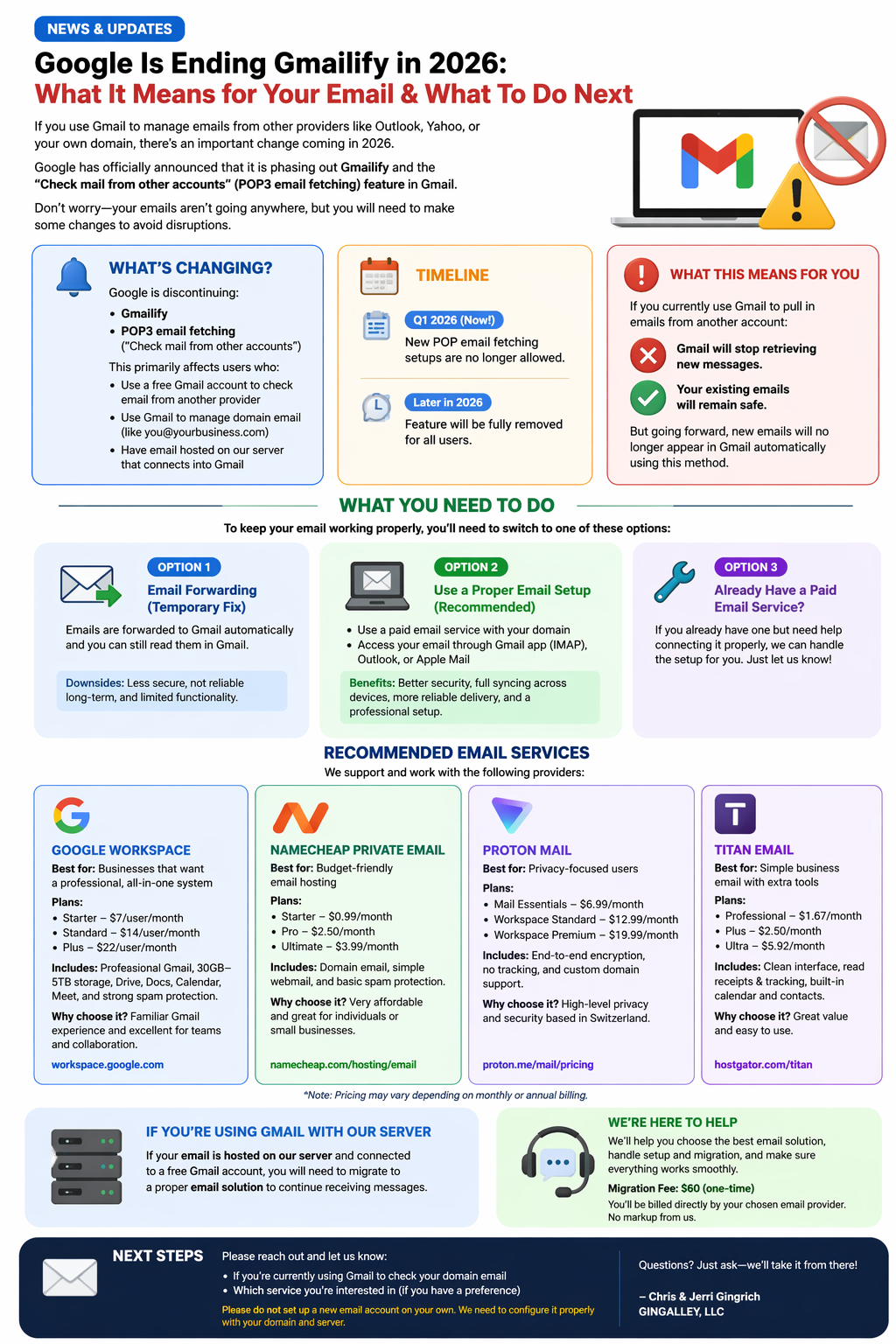
Google has officially announced that it is phasing out Gmailify and the “Check mail from other accounts” (POP3 email fetching) feature in Gmail.
For many people, this means Gmail will no longer function as an “all-in-one inbox” the way it does today.
Don’t worry—your emails aren’t going anywhere—but you will need to make some changes to avoid disruptions.
This does NOT affect our clients already using a paid Google Workspace or Microsoft 365 account.
📢 What’s Changing?
Google is discontinuing:
- Gmailify (used to link external accounts into Gmail)
- POP3 email fetching (used to pull emails into Gmail from other inboxes)
➡️ This primarily affects users who:
- Use a free Gmail account to check email from another provider
- Use Gmail to manage domain-based email (like you@yourbusiness.com)
- Have email hosted on our server that connects into Gmail
📅 Timeline
- Q1 2026 (Now): New POP email fetching setups are no longer allowed
- Later in 2026: Feature will be fully removed for all users
⚠️ What This Means for You
If you currently use Gmail to pull in emails from another account:
❌ Gmail will stop retrieving new messages
✅ Your existing emails will remain safe
But going forward, new emails will no longer appear in Gmail automatically using this method.
✅ What You Need To Do
To keep your email working properly, you’ll need to switch to one of these options:
Option 1: Email Forwarding (Temporary Fix)
- Emails are forwarded to Gmail automatically
- Still lets you read messages in Gmail
⚠️ Downsides:
- Less secure
- Not reliable long-term
- Limited functionality
Option 2: Use a Proper Email Setup (Recommended)
This is the best long-term solution.
- Use a paid email service with your domain
- Access your email through:
- Gmail app (IMAP setup)
- Outlook
- Apple Mail
✅ Benefits:
- Better security
- Full syncing across devices
- More reliable delivery
- Professional setup
Option 3: Already Have a Paid Email Service?
If you already have one but need help connecting it properly:
👉 We can handle the setup for you—just let us know.
💼 Recommended Email Services
We support and work with the following providers:
🔷 Google Workspace
Best for: Businesses that want a professional, all-in-one system
Plans:
- Starter – $7/user/month
- Standard – $14/user/month
- Plus – $22/user/month
Features:
- Professional Gmail with your domain
- 30GB–5TB cloud storage
- Google Docs, Drive, Calendar, Meet
- Strong spam protection
Why choose it:
- Familiar Gmail experience
- Excellent for teams and collaboration
🔗 https://workspace.google.com/
🟢 Namecheap Private Email
Best for: Budget-friendly email hosting
Plans:
- Starter – $0.99/month
- Pro – $2.50/month
- Ultimate – $3.99/month
Features:
- Domain-based email
- Simple webmail interface
- Basic spam protection
Why choose it:
- Very affordable
- Great for individuals or small businesses
🔗 https://www.namecheap.com/hosting/email/
🔒 Proton Mail
Best for: Privacy-focused users
Plans:
- Mail Essentials – $6.99/month
- Workspace Standard – $12.99/month
- Workspace Premium – $19.99/month
Features:
- End-to-end encryption
- No tracking
- Custom domain support
Why choose it:
- High-level privacy and security
- Based in Switzerland
🔗 https://proton.me/mail/pricing
🟣 Titan Email
Best for: Simple business email with extra tools
Plans:
- Professional – $1.67/month
- Plus – $2.50/month
- Ultra – $5.92/month
Features:
- Clean interface
- Read receipts & tracking
- Built-in calendar and contacts
Why choose it:
- Great value
- Easy to use
🔗 https://www.hostgator.com/titan
*Note: Pricing may vary depending on monthly or annual billing.
⚙️ If You’re Using Gmail With Our Server
If your email is:
- Hosted on our server
- Connected to a free Gmail account
👉 You will need to migrate to a proper email solution to continue receiving messages.
🧭 We’re Here to Help
We know this change can be confusing—but we’ve got you covered.
We will:
- Help you choose the best email solution
- Handle setup and migration
- Ensure everything works smoothly
💲 Migration Fee: $60 (one-time)
💳 You’ll be billed directly by your chosen email provider (no markup from us)
📩 Next Steps
Please reach out and let us know:
- If you’re currently using Gmail to check your domain email
- Which service you’re interested in (if you have a preference)
⚠️ Please do not set up a new email account on your own—we need to configure it properly with your domain and server.
If you have questions, just ask—we’ll take it from there 👍
—GINGALLEY, LLC